Rechercher dans ce blog

Friday, July 2, 2021

iPadOS 15 beta preview: Widgets and Quick Notes make for a new experience - Engadget

iPadOS 15 is arriving at a crucial time for the iPad. Ever since the well-designed and overly powerful 2018 iPad Pro arrived, people have increasingly asked Apple to make its tablet software as flexible and impressive as its hardware. This year’s iPadOS update isn’t going to satisfy those who want the iPad to work more like a Mac — it still feels like an iPad, for better or worse.

That said, Apple has made a handful of significant changes and a host of smaller ones, all of which add up to an experience that makes the iPad more customizable and flexible than before while still retaining (and improving upon) the basic iPad experience. There are a lot of new features to unpack, and the just-released iPadOS 15 public beta is still a work in progress, but here are some of the most significant changes to look forward to when the final software arrives this fall.

Should you install iPadOS 15?

But first, a note about that beta status. Apple’s public betas are generally pretty reliable, and that’s true here, too. I’ve generally been able to use my 11-inch iPad Pro without any issues, but apps occasionally crash and throw me to the Home Screen; interacting with notifications doesn’t always work; and there are various other hiccups here and there. (Examples: my cursor doesn’t always move to the search field when I summon it, and the last few letters of my messages are sometimes cut off when using the app in Slide Over.) It’s nothing deal-breaking, but it’s noticeable, particularly when I use my iPad for multiple hours at a time. Unless you're extremely curious, I'd wait for a few more beta versions to be released before giving it a shot, unless you can put it on a back-up iPad.

With that out of the way, let’s dig into the new features. The most obvious change in iPadOS 15 is that widgets have come to the Home Screen. As with last year’s iOS 14, iPad users can now pin widgets anywhere they want. You can also select which apps you want to show on the Home Screen and stash the rest in the App Library, an auto-organized place to find everything you’ve installed on your iPad. Both widgets and the App Library came to the iPhone last year, and it was surprising that they didn’t arrive on the iPad until now.
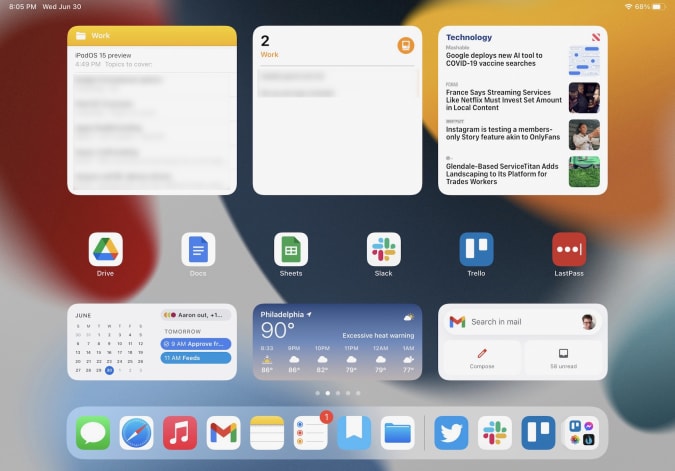
iPadOS 15
My "work" home screen.

I’m glad Apple did this, because it makes your iPad’s home screens far more customizable than before, something sorely needed on a big-screen device. It took a little work, but I’ve now hidden the apps I don’t use as much in the App Library and now have five home screens curated for work, entertainment, games and so forth. For example, my work screen only has six app shortcuts (Drive, Docs, Sheet, Trello, Slack and LastPass), but the variety of widgets I have installed provides glanceable info and easy access to a lot of tools. I have a widget showing recent notes in the “work” folder, another with Reminders (also specifically from my work group), an Apple News widget showing the latest tech news, and widgets for Google Calendar and Gmail. All that, plus the apps in my dock, make this the prime place to go when I need to get things done.

Quick Notes

The other new feature that could fundamentally change the iPad experience is Quick Notes. As Apple’s Craig Federighi said during last month's WWDC keynote, Notes are now a “system-wide” feature. Swiping in from the lower right corner summons a new note that floats above whatever apps you’re using. You can quickly type or write down (with the Apple Pencil) whatever comes to mind and then swipe the note away when you’re done. Depending on your settings, you can start a new note every time you access Quick Notes, or just keep adding to the same one. Finally, you can swipe between Quick Notes you’ve started if you want to get to a specific document.

iPadOS 15 Quick Notes
At the top of this Quick Note is a button that automatically appears to let you save a link to the page you're visiting.

The iPad’s Slide Over multitasking feature offered an approximation of this experience, but Quick Notes is far more flexible. For starters, you can move a Quick Note anywhere on the screen you want, making it feel like a true “window” reminiscent of something you would use on Windows or macOS. If you’re going to jump in and out of the same note frequently, you can dismiss it to the side of the iPad screen where a little arrow shows that you can summon it back quickly.

Apple’s Quick Note demos mostly focused on using the Apple Pencil to quickly jot things down, but it works just as well with a keyboard. When I’m doing work, it’s almost always with the Magic Keyboard attached, and being able to quickly summon a persistent document to take notes in, regardless of what else I was doing, makes the iPad feel significantly more versatile. It’s a great tool when doing research, especially since you can add links to web pages in Safari or destinations in Maps with one tap. My only real complaint is that the “swipe in from the bottom right” gesture is a little awkward, especially when using the iPad docked to a keyboard. It’s much with the Apple Pencil.

Multitasking

Multitasking was a major focus at WWDC, as well. While Apple did make some useful changes here, the fundamental iPad multitasking experience is still the same. Apps can take up the whole screen, or share the display with a second app in Split View. There’s also the Slide Over area, which lets you quickly summon a floating window containing another app. Apple has made major improvements to these features over the years, but they’re the same fundamental multitasking options we’ve had since iOS 9 back in 2015.
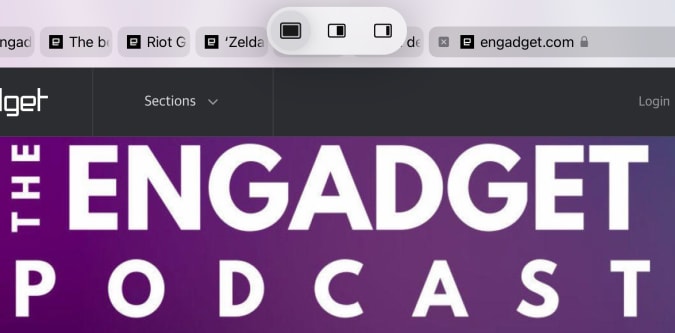
iPadOS 15 multitasking menu
The tiny multitasking menu can be handy, once you know how to use it.

If you’ve been hoping for a true windowed multitasking experience, this isn’t it. But Apple has made it easier to work with the multitasking features it does offer. Now, there’s a tiny three-dot menu at the top of every app you use that lets you move the app between full screen, slide over and split view. As I compose this sentence, I’m typing in the Notes app, full screen. If I want to take Notes into Split View and share the screen with Safari, I just tap the multitasking menu and hit the Split View icon. This gives me a full view of my Home Screen, which then lets me pick anything I want to go alongside Notes.

Being able to quickly choose from any app on your Home Screen when setting up a multitasking view is a big improvement; before, you primarily had to use search to find the app you want, or drag one of the apps available in your dock. The menu also makes it a lot easier to move apps between Split View, Slide Over and full-screen views. Previously, you had to be aware of a variety of gestures, but a few minutes of playing with the multitasking menu makes the behavior pretty clear.

Safari

The last major change I’ll cover at this early stage is Safari. It’s one of the most important apps on the iPad, and it’s gotten a lot better in the last few years. But for iPadOS 15, Apple has made what I predict will be a polarizing design decision. In an effort to slim down the top menu bar, Apple crammed the URL bar and open tabs into one row. Essentially, a tab and its URL bar are now represented by a single visual cue.

This means that the location of the URL bar moves. If you’re looking at the right-most tab you have open, for instance, the URL bar is all the way to the right. It definitely takes some time to get used to, since most of us are used to it always being right in the center of whatever browser we’re using. This also makes it harder to see all your tabs; besides the “active” tab, I can currently see eight others. The rest are hidden off to the left and right of my active tab. To see them, you’ll have to scroll either direction to find what you’re looking for.


iPadOS 15 Safari menu bar
Because my active tab is the one furthest to the right, the URL bar in my window is also far to the right.
iPadOS 15 Safari menu bar
In this case, my active tab is to the far left, and so is the URL bar.

Apple’s menu bar cleanup also means it removed the button that zooms out to show you a preview of every tab you have open. I used that constantly, so I hate this change. And unlike on the Mac, you can’t customize the Safari menu on the iPad at all. Now, you either have to use a keyboard shortcut or pull up the new sidebar, which contains all the open tabs in a window along with your bookmarks, reading list, history and links shared in Messages.

Safari on the iPad already did a great job of hiding the menu bar once you started scrolling through a site, so this change feels unnecessary to me. I’ll be curious to see what kind of feedback Apple gets during the beta, because I wager plenty of other people will prefer the old layout.
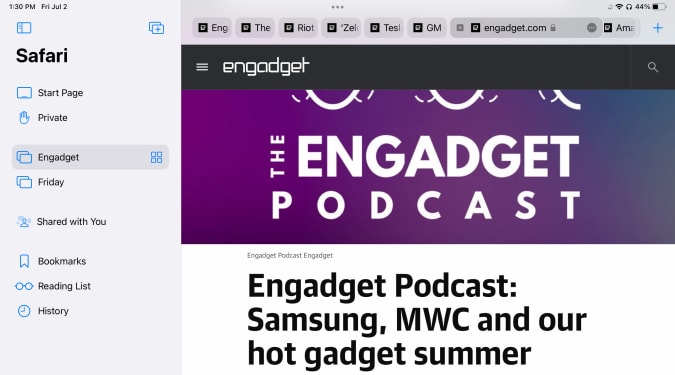
iPadOS 15 Safari sidebar
Safari's new sidebar holds your tab groups as well as usual items like bookmarks and your reading list.

There is at least one good thing about the new Safari: tab groups. They’re handled elegantly, with a button in the sidebar letting you open either a new “blank” group for you to populate or taking all your current tabs and saving them as a group. You can swap between groups in the sidebar, and access any groups you’ve created in any open Safari window you have. Groups will also sync across your other devices, assuming you’ve upgraded to iOS 15 or macOS Monterey. Having different tab groups for different tasks has already proven useful to me, and I’ll probably use them even more as I get used to incorporating them into my workflow.

More to come

There are plenty of other significant changes to iPadOS 15, things like the new Focus system and notifications revamp, improvements to FaceTime and Messages, the new Universal Control system that works between a Mac, iPhone andiPad, and plenty more. (You can read about some of these changes in our previews of iOS 15 and macOS Monterey.) We’ll be doing a proper review of all the new software in its final form this fall, but in the meantime I’m going to keep digging into the future beta releases to see how iPadOS 15 changes between now and its wider release.

All products recommended by Engadget are selected by our editorial team, independent of our parent company. Some of our stories include affiliate links. If you buy something through one of these links, we may earn an affiliate commission.

Adblock test (Why?)


iPadOS 15 beta preview: Widgets and Quick Notes make for a new experience - Engadget
Read More

Mysterious Icon Shows Up on CarPlay, It's Actually a New Feature - autoevolution

[unable to retrieve full-text content]

Mysterious Icon Shows Up on CarPlay, It's Actually a New Feature  autoevolution
Mysterious Icon Shows Up on CarPlay, It's Actually a New Feature - autoevolution
Read More

New Qualcomm CEO sees former Apple execs as key to beating M1 - The Verge

Qualcomm’s new CEO, Cristiano Amon, has big plans for competing with Apple when it comes to laptop performance, thanks to the ex-Apple employees Qualcomm brought on when it acquired Nuvia earlier this year. He told Reuters that he believes Qualcomm could make the world’s best processor, which would require designing a chip better than Apple’s M1.

Before assuming his new role as CEO, Amon was head of Qualcomm’s semiconductor division and was in charge of the company’s acquisition of Nuvia for $1.4 billion. The startup was founded by three former Apple engineers who specialized in chip design and worked on Apple’s A-series SOCs. Those founders joined Qualcomm, and it’s apparent now that they’ll be focusing on making chips for consumer computers (though the company wouldn’t turn down the chance to license its tech to data centers, according to Reuters). Qualcomm hopes to start selling Arm laptop chips, powered by Nuvia’s designs, next year.

Amon also hopes to use the company’s experience in making 5G chips and smartphone processors to help provide a better laptop experience, by building 5G connectivity into its laptop-focused CPUs. Adding 5G, or any cellular compatibility at all, is something that Apple hasn’t done yet for its M1 Macs, despite demand from some (though it’s M1-powered iPad Pro has a 5G option).

It’s safe to say that if Qualcomm wants to become a dominant player in powering laptops like it is in the smartphone market, it has a lot of work to do. While Microsoft does use Qualcomm-designed chips in its Surface Pro X (which made an appearance at the Windows 11 event), the list of Windows PCs with Qualcomm inside isn’t a long one. It’s also unlikely that Intel is planning on just letting Arm take over the laptop space without a fight — the company is working on hybrid CPUs that, like Arm, mix high-power and efficiency-focused cores to provide better battery life, but using an x86 architecture.

Amon also talked to Reuters about challenges and opportunities the company faces due to sanctions in China and about the company’s struggles to become a household name like Intel or AMD.

Adblock test (Why?)


New Qualcomm CEO sees former Apple execs as key to beating M1 - The Verge
Read More

iOS 15: Download and install the beta on your iPhone or iPad right now. Here's how - CNET

118-iphone-12-purple-2021

The very first glimpse of iOS 15 is here. We'll tell you everything you need to know about getting it on your phone. 

Sarah Tew/CNET
This story is part of Apple Event, our full coverage of the latest news from Apple headquarters.

The first public betas of iOS 15 and iPadOS 15 are freshly arrived and ready for your compatible iPhone or iPad (there's also a list at the bottom of this post). Apart from the hardware, all you need is a willingness to live with software that may not work 100% of the time -- no special account necessary, unlike with the iOS 15 developer beta. This public beta means you're free to tinker with the iOS 15 preview to your heart's content.

Apple first announced iOS 15 and iPadOS 15 at WWDC 21 in early June, and is expected to arrive in its fully fledged version sometime this fall. The update brings plenty of new features to both devices. For example, there are new FaceTime features (allowing Android and PC users to take part for the first time) and iMessage improvements that make it easier to track links and photos your friends have sent. The iPad is getting a complete home screen revamp, and multitasking is finally receiving the boost it's needed for years. 

Before you rush on to the installation steps below, take a minute to create a backup of your iPhone or iPad on your computer. You can go back to iOS 14 if you decide iOS 15 isn't stable enough for you, but any iCloud backups made on iOS 15 can't be used to restore a device on iOS 14. By creating a backup on your computer before enrolling in the public beta, you'll have a restore point. With the boring part out of the way, let's dive into the installation process.

Now playing: Watch this: Installing (and uninstalling) Apple's iOS 15 public beta

6:45

How to install Apple's iOS 15 and iPadOS 15 public beta

The public beta is rolling out right now. If you're having trouble accessing the site, keep trying. Apple's servers are overloaded at the moment. Once you get the site to load, you can follow the steps outlined below. 

Start by enrolling your iPhone or iPad in the public beta program. You'll need to use Safari on your iPhone or iPad to visit this page. If you've previously taken part in the public beta, sign in using the same Apple ID you used previously. Otherwise, click the Sign Up button and follow the prompts. You'll need to sign in with the same Apple ID you're using on your iPhone or iPad. 

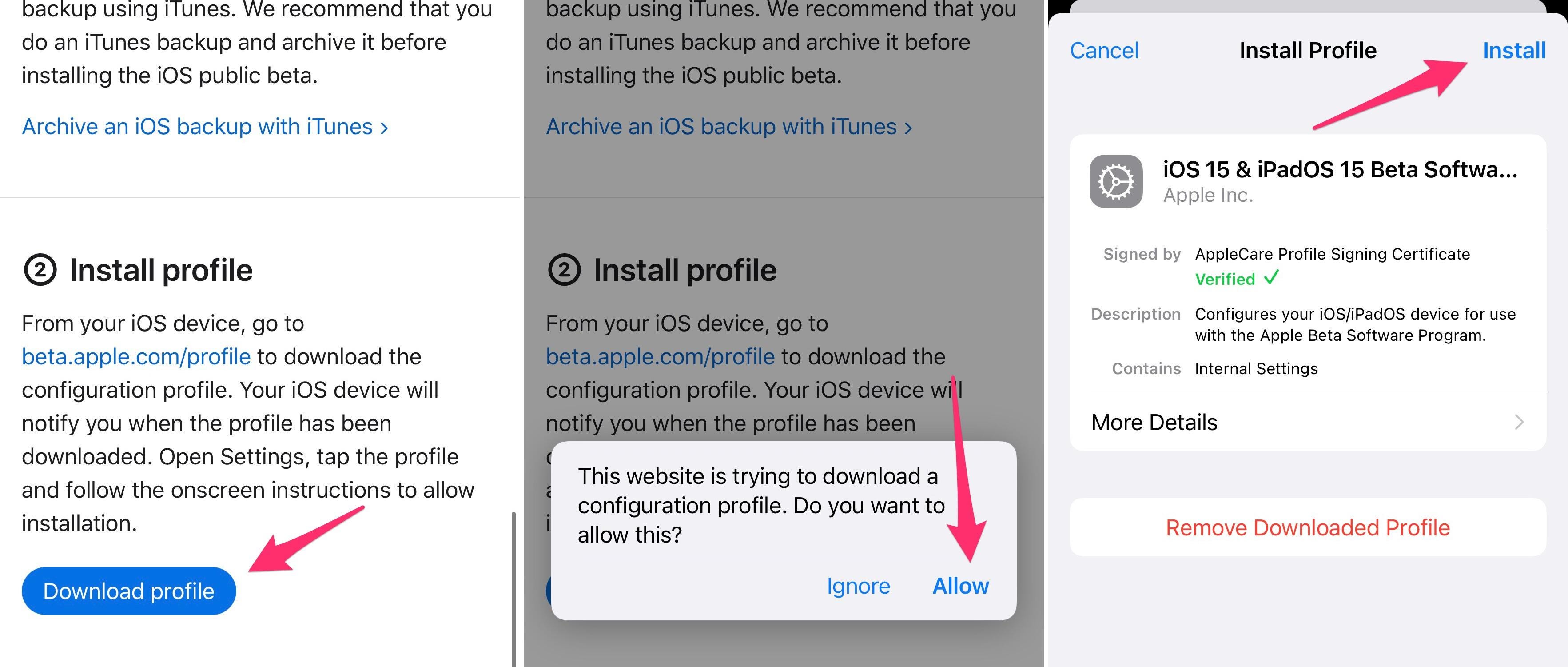
install-ios-15-beta

You'll need to install a beta profile, restart your device and then install the update as you normally would. 

Screenshots by Jason Cipriani/CNET

Now that you're signed in, click on the appropriate OS for your device. For example, click on iOS if you're enrolling your iPhone, or iPadOS if you're enrolling your iPad. In the Get Started section will be a link titled Enroll your device; click it. Read through Apple's instructions, which include the same advice I just offered -- creating a backup before going any further. With your device backed up, install the beta profile by tapping on the blue Download profile button. 

Next, open the Settings app, tap the beta profile that's near the top of your screen. You'll be asked to approve it's installation, and then prompted to restart your device. After your iPhone or iPad reboots, you can install the beta as you would a regular software update by going to Settings > General > Software Update. 

It's a fairly big download, so make sure you have a reliable Wi-Fi connection to speed up the process. It's also a good idea to plug your phone into a charger to ensure your device doesn't run out of power mid-upgrade. 

Will iOS 15 and iPad 15 work with my iPhone and iPad?

Apple published a list of devices that will receive the update when it officially launches later this year. It's easy to figure out if your iPhone or iPad will run iOS 15. If it's running iOS 14 right now, then you'll be able to install the update when it's released later this year. Here are all of the compatible devices:

Devices that will support iOS 15, iPadOS 15

iPhone 12 Mini iPad Pro 12.9-inch (5th generation)
iPhone 12 iPad Pro 11-inch (3rd generation)
iPhone 12 Pro iPad Pro 12.9-inch (4th generation)
iPhone 12 Pro Max iPad Pro 11-inch (2nd generation)
Phone 11 iPad Pro 12.9-inch (3rd generation)
iPhone 11 Pro iPad Pro 11-inch (1st generation)
iPhone 11 Pro Max iPad Pro 12.9-inch (2nd generation)
iPhone XS iPad Pro 12.9-inch (1st generation)
iPhone XS Max iPad Pro 10.5-inch
iPhone XR iPad Pro 9.7-inch
iPhone X iPad (8th generation)
iPhone 8 iPad (7th generation)
iPhone 8 Plus iPad (6th generation)
iPhone 7 iPad (5th generation)
iPhone 7 Plus iPad Mini (5th generation)
iPhone 6s iPad Mini 4
iPhone 6s Plus iPad Air (4th generation)
iPhone SE (1st generation) iPad Air (3rd generation)
iPhone SE (2nd generation) iPad Air 2
iPod Touch (7th generation)

Along with the iOS 15 and iPadOS 15 public beta, Apple also released the first public beta of WatchOS 8. If you decide a few weeks from now that iOS 15 or iPadOS 15 are just too buggy, you can still go back to iOS 14.

Adblock test (Why?)


iOS 15: Download and install the beta on your iPhone or iPad right now. Here's how - CNET
Read More

PSP Games Aren't Going Anywhere, At Least On Vita and PS3 - IGN - IGN

Sony will continue to sell PSP games via the PS3 and Vita stores despite the closure of the PSP store.

PlayStation has updated the messaging on its support page for "discontinued apps, features and services" to reflect the change amid the shutdown of the PSP store. "You'll still be able to purchase and play PSP content that is available on the PS3 and PS Vita stores," the site says. "However, you'll no longer be able to make purchases via the in-game store for PSP content."

The newly-released notice on the site also makes clear that users will still be able to download previously purchases PSP content, though, from July 6, users will no longer be able to perform searches or make in-game purchases. It was previously stated that "PSP commerce functionality" would end on July 2 but, up until now, it was unclear what Sony had planned.

Sony originally announced in March that it would be shutting down the PlayStation Store for PlayStation 3 and PSP on July 2, 2021, and the PSN Store for the Vita on August 27, 2021. The company addressed the store closure in an email sent out to customers, confirming that they would still be able to re-download and play previously purchased games and videos.

The news was met with dismay from video game preservation advocates after knowing many legacy games from the PS1 and PSP era would no longer be available after a certain date. The public outcry seemingly prompted Sony to reverse that decision, as Sony released a fresh statement in April to reveal that the stores for PS3 and PS Vita would continue to live on.

The Best PS5 Games

While Sony was keeping the PlayStation Store operational for PS3 and PS Vita devices, it was never made entirely clear whether PSP content would be available for sale on those platforms. The clarity gained from the latest update will be great news for those who still use these systems and for the preservation of video game history as a whole.

Adele Ankers is a freelance writer for IGN. Follow her on Twitter.

Adblock test (Why?)


PSP Games Aren't Going Anywhere, At Least On Vita and PS3 - IGN - IGN
Read More

Apple's newest tool will be the unsung hero of your next favorite app - CNET

Apple Developers
Apple
This story is part of WWDC 2021. All the latest coverage from Apple's annual developers conference.

Every summer, the majority of Apple users gauge their excitement about the progress of the Apple ecosystem based on the hardware the company occasionally unveils at its WWDC event -- though there was none in 2021 -- and the new software features that are announced to power the iPhone, iPad, Mac, Apple Watch and other products. But there's another subtext to WWDC that often makes larger -- albeit quieter -- waves across the oceans of Apple platforms.

Every WWDC brings a toolbox of new toys for software developers and app-makers, and these eventually result in more robust apps that eventually make these devices even more useful. Whatever your favorite apps are -- from YouTube to Uber to Cash App to Waze to Zoom -- they often have become invaluable based on new technologies, tools or capabilities that Apple made available to app builders.

Now playing: Watch this: WWDC 2021 in 11 minutes

11:15

And 2021 has brought some huge new developments for coders -- including one that could drive massive efficiencies in the way software and apps are built for Apple devices. 

CNET spoke with Susan Prescott, Apple's vice president of worldwide developer relations, and Andreas Wendker, Apple's vice president of tools and frameworks engineering, about the big focus on new tools for developers in 2021.

It's also important to remember that this comes at a time when Apple has faced a tremendous level of scrutiny over its relationship with developers. It's being examined by lawmakers and regulators in the US and abroad. In Washington, legislators are considering a half-dozen bills that would overhaul antitrust to scrutinize big tech companies, including Apple. Plus, Apple is still awaiting judgment in the lawsuit brought by Fortnite-maker Epic Games, which argued that Apple holds monopoly power over its App Store and unfairly takes money from developers.

Tools that make app building more approachable continue to be a key focus for Apple, especially related to the advances in Swift Playgrounds. "Our feeling is every kid should have exposure to learning to code, not because every kid is going to become a coder but because the world around us is fueled by code," said Prescott. "We're going to help as many people as we can in as many walks of life as possible, from as many communities and cultures as possible, to learn to code."

At WWDC, Apple announced that Swift Playgrounds will no longer be just for learning how to code, but you'll be able to build iPhone and iPad apps directly in Swift Playgrounds and deploy them to the App Store.

"All these advances in tools and technologies are the result of a vision that we've been executing on for years," said Wendker. "They're really the result of a never-ending focus on our side to build long-lasting platforms that create lots of value for developers and users."

The 2021 upgrades for developers

Some more of those significant new developments for software-makers unveiled at WWDC this year included:

SharePlay for Apps: With the new SharePlay API, developers can enable users to share video, movies, music and other multimedia through FaceTime and across platforms (iPhone, iPad, Mac and Apple TV). This will create group watch-party opportunities. MasterClass, Disney Plus, Twitch, HBO Max and Paramount Plus are already planning to support the feature in their apps.

In-App Events: Following on the long success and popularity of In-App Purchases, Apple is adding In-App Events so that apps can include live and/or scheduled events such as breaking news, watch parties, concerts, meet-ups, workout sessions and many other possibilities that app-makers are likely to explore. These can be premium paid events or free community-building events.

TestFlight for Mac: The venerable TestFlight app, which has been on iOS and other Apple platforms for years and has enabled testing of prerelease software, is finally coming to Mac and should streamline the development of more Mac apps. That's especially relevant in the era of the new Apple Silicon-powered M1 Macs, which are re-energizing the platform. 

RealityKit 2 for AR: While we wait for the hardware to be ready for augmented reality glasses, Apple pushed AR content another step forward with the launch of its next-generation RealityKit 2 at WWDC 2021. RealityKit 2 introduces many new functions but one of the best ones for building AR content is the new object capture that can use photogrammetry from the iPhone or iPad camera to rapidly turn real-world objects into 3D models. 

Swift parallel coding: Swift UI and SwiftPlaygrounds got a bevy of upgrades for 2021, and Prescott said that over half of the top 1,000 apps on the App Store are now built on Swift. But the big announcement at WWDC 2021 was that Swift now supports asynchronous and parallel programming to write faster and more efficient code.

Read more: iOS 15: Release date, public beta and new features

Xcode Cloud

There are also a plethora of other new tools and APIs that Apple announced for 2021. But perhaps the biggest announcement of all was Xcode Cloud, which is part of the new Xcode 13 -- Apple's primary tool for building apps and software for all of its devices and platforms. Xcode Cloud is Apple's new "continuous integration and delivery service."

"There are a lot of steps that developers have to go through when they develop apps, like testing and integrating [their code] with their coworkers, and that takes a lot of time," Wendker said. "And frankly, a bunch of these tasks are often very mundane and developers don't want to do them. So, the idea behind a continuous integration system like Xcode Cloud is that it basically offloads a lot of these tasks that can be automated into the cloud."

Apple designed Xcode Cloud to work for both small groups of app developers and big businesses -- and especially teams of remote workers, which is why using the cloud makes sense. While larger or more advanced teams may have already set up their own systems to do what Xcode Cloud does, this now makes it a standard part of the Apple development environment and democratizes it for all the teams making apps for Apple devices.

"It gives developers back a lot of their time so they can really focus on their code," said Wendker. "And that means they have more time to find bugs and issues in their code, they find them earlier, and so they create higher quality apps and they have more time to work on [adding] features."

The Xcode 13 beta is available for software developers to try out, if they have an active Apple Developer account.

Adblock test (Why?)


Apple's newest tool will be the unsung hero of your next favorite app - CNET
Read More

Never mind 5G. This is what 6G could look like - CNET

6g-logo-original-green-purple-blue
Sarah Tew/CNET

Carriers around the world have launched their 5G networks. Nationwide coverage is available in the US from the big three providers. Compatible smartphones are getting cheaper. The next-generation wireless technology is rapidly maturing. 

So let's talk about the next-next-generation wireless technology. Yes, 6G. 

Each wireless generation lasts about a decade, so 6G is a long, long way from becoming reality. Maybe in 2029 we'll get a hint of a deployment. Still, it's worth considering the technology that will be around the next corner and looking at what wireless researchers are thinking about in terms of its potential. 

5G won't stand still as 6G is developed. As wireless executives convened (virtually) at the Mobile World Congress conference this week, a separate group of researchers from hundreds of companies representing the 3GPP standard-setting body met to talk about 5G Advanced, a marketing buzzword coming to a commercial near you. 

Attending that discussion was Tingfang Ji, senior director of engineering at Qualcomm and one of the lead 5G researchers at the company. Ji, who holds more than 800 patents at Qualcomm, offered some insight into what both 5G Advanced and 6G technology might look like. 

6G will sense your environment

It's worth looking back before looking to the future. The move to 4G saw a big boost in speed. Now 5G offers greater connectivity for multiple devices, as well as breakneck speeds, particularly in city centers like Times Square and arenas such as football stadiums. While 6G will undoubtedly bring even higher speeds, a key benefit will be using those radios to sense your surroundings as well as to ferry information.

There's already work on this in 5G, with the phone's radio acting like a GPS device to figure out your location. With 6G, your phone will be able to figure out the devices around you, serving as a bridge between the physical and digital worlds. Those nifty augmented reality demos -- the ones that feature digital menus popping up on your eyeglasses screen when you look at a restaurant -- could materialize with 6G.

Apple already uses Bluetooth embedded in its network of devices to let people track objects with its AirTags. But Ji says the 6G experience will be more like radar, allowing for more interaction between devices. 

"You can actually sense the environment, so it should be more powerful," Ji said. 

With 6G, the industry is looking to expand into new bands of spectrum. Wireless carriers embraced gigahertz frequencies, which offer you a huge amount of speeds -- comparable to a speedy fiber landline connection -- but limited range. Ji said they were looking at terahertz spectrum, which operates at a frequency that's 1,000 times faster than gigahertz (which itself is 1,000 times faster than a megahertz). 

It's important to note that frequency doesn't exactly correspond to speed, but it gives you a sense of how much more capacity you could get with 6G. 

The next-next-generation technology could also solve the dilemma that gigahertz spectrum faces now. It could potentially offer both higher capacity and wider range in a best-of-both-worlds scenario. 

"There will be some fundamental technology we will want to introduce to overcome that," he said. "It's something we're working on that's super exciting."

What is 5G Advanced?

Work on 6G is just getting started. Right now, it's little more than a collection of ideas and goals. More concrete is the prospect of 5G Advanced, an upgraded version of 5G that could come in the next two and a half years. 

While no one knows for sure what it will consist of, there's industry movement to clarify the picture. At their meeting, researchers under the 3GPP group debated what improvements the industry should focus on. 

"5G Advanced gives us a second chance to look at the fundamental tradeoffs inside 5G," Ji said. 

There are 50 areas that researchers are looking at, but they will likely get narrowed to about 20, he added. 

Qualcomm has proposed integrating machine learning into 5G and for the networks to better handle internet of things devices. It's also proposing to use full duplex radios, in which both sides can communicate with each other simultaneously. (Typically, it's one-way traffic.) 

"There's a wide area where we can make a substantial boost to the technology," Ji said. 

The 3GPP organization counts 700 companies, including Apple, Google and Huawei, so what Qualcomm is proposing may not be what the industry focuses on. 

Again, this is technology that isn't going to show up in your phone for a while, so no need to hold off on that upgrade for 5G Advanced. And 6G, despite a sense of where it may go, is barely on the map. 

See also: Best 5G phones for 2021

Adblock test (Why?)


Never mind 5G. This is what 6G could look like - CNET
Read More

Google's encryption-breaking Magic Compose AI proves iPhone shouldn't support RCS messaging - BGR

For years, Google has been dying to come up with an iMessage equivalent, a key iPhone feature that’s probably responsible for stealing plent...